dimanche 15 avril 2012

Hide a partition - Windows 7.

0 commentaires
To protect access to a partition, you can prevent it to appear in the explorer.

1- Click the Start button. In the Find box, type the command gpedit.msc and hit Enter.


2- In the Editor window for local group policy that opens, scroll down click User Configuration, Administrative Templates, Windows Components, Windows Explorer. 


3- Double click the setting in My Computer Hide these specified drives. 


4- Select the Enabled option. 


5- Select from the dropdown then drives to mask.

  
6- Confirm with OK. The selected partitions no longer appear in Windows Explorer. Note that they remain accessible to your system and software. They simply appear in the explorer and more in dialogs (eg Open). 

 
Read full post »

Lock his computer in his absence - Ubuntu Linux.

0 commentaires
When you leave a few minutes, you can lock your Linux computer so that nobody can access your data. Then you can find your session as you left it.
 
1- Simultaneously press the Ctrl, Alt and L.

2- Your session is locked and the screensaver started.
 
 
 3- When you return, move the mouse and enter your password. Click Unlock.


4- You find your session as you had left it: software running, open documents, etc..
Read full post »

Disable search for updates Flash - Windows all versions.

0 commentaires
You probably installed the Flash plugin to play movies, games and movies on the Internet. Regularly, the software checks if updates are available. To switch this off, you must change the software settings.

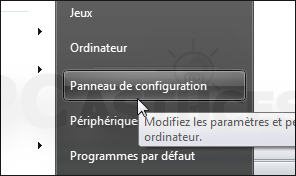
1- Click Start and then Control Panel.


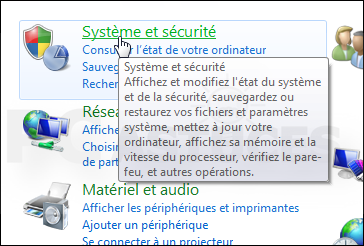
2- Click System and Security. 


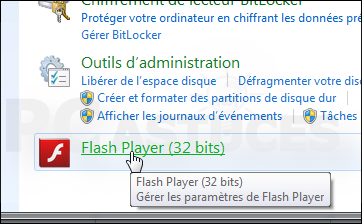
3- Click Flash Player. 


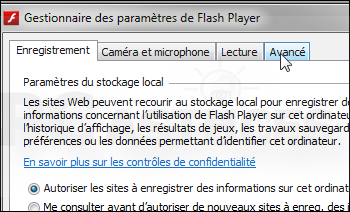
4- In the window that appears, open the Advanced tab. 


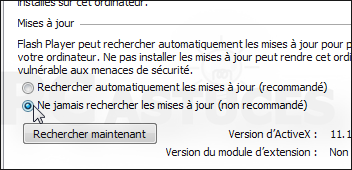
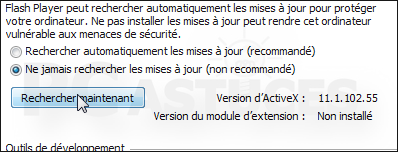
5-  Select Never check for updates.


6-  Close the window to save the change. At any time, you can search manually update by going back in the advanced settings of Flash Player and clicking Find Now.

 
Read full post »

Exploit the fields in a dialog box with the keyboard - Windows all versions.

0 commentaires
When you display a dialog box on the screen, you can access individual fields using the mouse. But sometimes it's faster to use the keyboard.

1- Press the Tab key to move from one input field to the next.


2- Simultaneously press the Alt and Tab to the previous field. 


3- Use the arrow keys to move from one element to another.

  
4- Press the Spacebar to check a box or select an item. 

 
Read full post »

Register their queries - Windows 7.

0 commentaires
If you often search with multiple filters, you can save them for quick access next time.

   1-  In Windows Explorer, start your search by entering your keywords in the search field.


 2- Click on Save Search.

 3- Enter a name and confirm the research.


 4- Your search is available in the tree pane of the Explorer, the Favorites section.

Read full post »

Remove a file indexing - Windows 7.

0 commentaires
Recommend to a friend Print this page RSS feeds PC Tips PC Tips Follow on Twitter
You want a folder and its contents no longer taken into account when you search in the explorer? You must remove them from indexing.


     1- Click the right mouse button on the folder to remove the indexing and click Properties.


2- On the General tab, click the Advanced button.


3- Uncheck Allow indexing of content. 


4- Confirm OK twice. 


5- In the window that opens, select Apply changes to this folder, subfolders and files and click OK.

  
Read full post »

Allow the Office appear quickly - Windows 7.

0 commentaires
In Windows 7, click the button to the right of the taskbar, you can make windows transparent and see your desktop and gadgets displayed above. If you have your hands on the keyboard, there are faster.

1- Simultaneously press the Windows key and space.

2- All windows become transparent to reveal the desktop.


Read full post »
 

Copyright © PC tricks Design by Free CSS Templates | Blogger Theme by BTDesigner | Powered by Blogger